Add this code in you theme functions.php. Make a child theme if you are using someone else theme to avoid your changes being overwritten during the next update.
/**
 * Change number of products that are displayed per page (shop page)
 */
add_filter( 'loop_shop_per_page', 'new_loop_shop_per_page', 20 );

function new_loop_shop_per_page( $cols ) {
  // $cols contains the current number of products per page based on the value stored on Options -> Reading
  // Return the number of products you wanna show per page.
  $cols = 9; //Enter the number of products you want per page here
  return $cols;
}
Facebook usually does a good job at picking up all the required information from your web page but there is some instance where you might want to have better control on what image is displayed as thumbnails or have a customize description for Facebook sharing. In that case you will need to use facebook open graph.
List of basic properties: https://ogp.me/
og:title
og:type
og:image
og:url
The required meta properties for open graph are the following according to facebook Sharing Debugger :
Automated this task will be a bit more challenging as the URL of the image will change from page to page. For instance, images from home page, post and product and category pages won’t be called the same so you have to check the type of page you are displaying to call the right type of image.
For the home page, you can set the og:image content manually. You will need to check first if the user is currently viewing the front page:
<?php
$app = JFactory::getApplication();
$menu = $app->getMenu();
$lang = JFactory::getLanguage();
if ($menu->getActive() == $menu->getDefault($lang->getTag()))
 {
  echo 'This is the front page';
 }
else
 {
  echo 'Accueil';
 }
?>
It seems there is a bug in Facebook Open Graph for the image property in website requiring https. We speak about it here. On my side the issue is only present in messenger. Sharing a page as a post is working as expected.
og:type
The default is ‘website’ but there exists a ‘product’ type that can be of interest in product pages
Work around 1: upload all your picture in a non https domain and use these URL for your og:image content property.
Work around 2: use og:image:secure_url and use the facebook sharing debugger to lint your page. https://developers.facebook.com/tools/debug/ [Work around currently in test]
One of the answer on the bug report above describe the issue clearly:
For the benefit of anyone like me who finds this after having experienced exactly the same issue, I believe I have a more rigorous explanation for exactly what’s going on. Codesquid posted a link on #5486 that provides all of the relevant information, which I shall re-post here for convenience:
The bug appears to lie in the standard itself, rather than Filezilla specifically. That is, the actions defined to ensure that \r\n line endings are always transmitted and then converted by the receiver to whatever is appropriate for that platform may fail if the source file itself has the wrong line endings for the client platform. For example (assuming one transfers the file using the ASCII data type):
IF: a file with CR-only line endings is uploaded FROM: a windows client TO: a linux server THEN: the transmitted file will only feature CRs, which will be deleted RESULTING: in a file with no newlines
Which is very bad news if your file contains line comments, since this will effectively change its meaning. Similarly,
IF: a file with Windows line endings (CR+LF) is downloaded FROM: a Linux/Mac server TO: a Windows or Mac/Linux client THEN: additional unwanted CR/LFs will be inserted RESULTING: in a file with mixed or double newlines
Other scenarios of this type can clearly be concocted, but I would have thought these two would be the most common. As codesquid pointed out, the data type can be specified for transfers. In the absense of a parser in Filezilla to handle malformed newlines, the only safe answer appears to be to use the binary type for all transfers.
To check the type of carriage return used in your file, you can turn that on in notepad ++ in View->Show Symbol->Show End of Line.
In my case, once downloaded via ftp from the linux server to my windows machine, the file showed CR for mark the end of the line. Other files not causing issue are making use of both CR and LF.
When reuploading the file using only CR on the linux server. All CR are removed and the file open in a single line when I open it for edit through FTP. As it is an executable file including comment, some code are commented out and the script don’t execute properly anymore.
Solution: To solve the issue, you can open use find and replace extended mode in Notepad++ and, in my case, replace \r by \r\n and save.
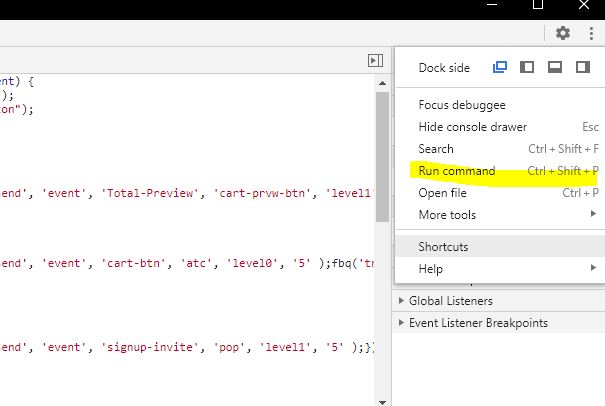
To find out what part of your CSS or JavaScript is not used, you will need to enable the coverage tab in the Chrome Developper Tool. For that you will need to run a command in the command window. The command window can be enabled in the right hand “three dot” menu of the Chrome Developper Tool.
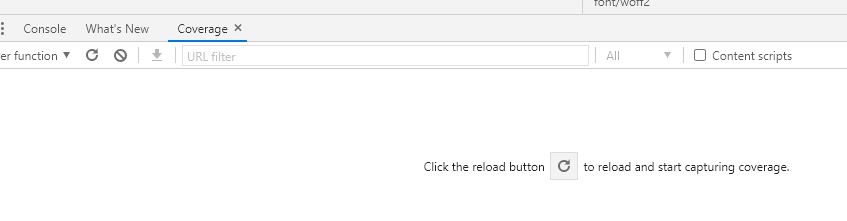
Type coverage and press enter. The coverage tab will now be available in the bottom window of your Google Developper Tool.
Reload the page to start the diagnostic.
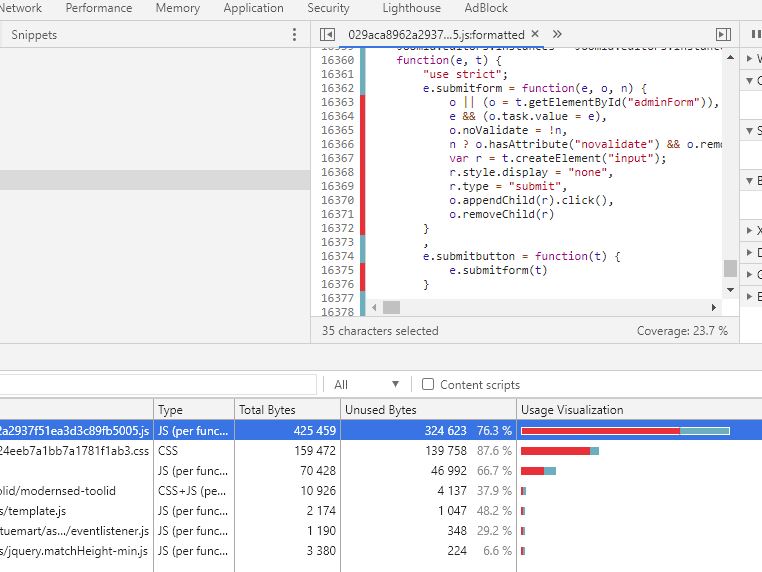
You will see listed your files, their type, size and amount of unused code as well as a graphical representation of the proportion of unused code compare to the total size of the file. By clicking one of the file it’s content will be displayed in the code window of the source tab and you’ll see that the beginning of the line of unused code will be highlighted in red. Now it will be your job to refactor the script so that only necessary CSS and js are loaded for any given page …ideally, as this is no easy task.
During the course of the year 2020, Google has announced that Core Web Vitals will be come a ranking factors. Google makes, such announcement when the company wants webmasters to prepare their website for the changes to come.
Core Web Vitals is a selection of metrics that help characterize the user experience on a page: how fast does it render? how fast is it interactive? Does the content of the page jump around when new element are loaded?
In technical terms thats gives:
Largest Contentful Paint (LCP): measures loading performance. To provide a good user experience, LCP should occur within 2.5 seconds of when the page first starts loading.
First Input Delay (FID): measures interactivity. To provide a good user experience, pages should have a FID of less than 100 milliseconds.
Cumulative Layout Shift (CLS): measures visual stability. To provide a good user experience, pages should maintain a CLS of less than 0.1.
You can find the Core Web Vitals for a page by using tools such as https://developers.google.com/speed/pagespeed/insights/ but they are also available in Google Search Console and other Google products.
As the opportunities for improvement will vary greatly from one website to another. I will develop here the one I encounter during my own optimization process, and hopefuly it will be useful to others. Let’s analyze some opportunities:
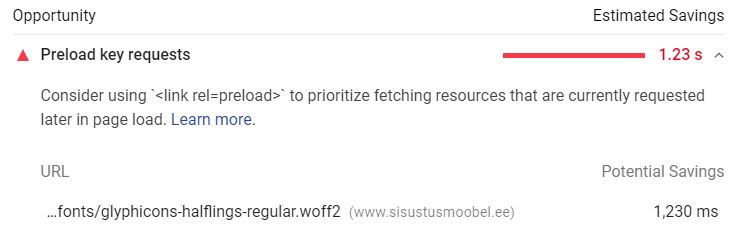
Preload keys requests:
Preloading a font to be loaded ahead of time so that when it is needed, it is already available.
Preloading content is also useful to help prevent blocking resource.
When preloading the font, Google Page Speed returns an error message that the font is not used:
Warnings: A preload <link> was found for “https://www.example.com/templates/horme_3/fonts/glyphicons-halflings-regular.woff” but was not used by the browser. Check that you are using the `crossorigin` attribute properly.
The first suggestion apply to my case as I don’t declare any width and height in the picture element. I got used to the flexibility of responsive image (calculated according the size of the screen) and didn’t move on to the srcset method where the different image size available are listed with specification regading the screen size it should be displayed at. This method requires to carefully plan break and the various size available to fit the different screen size. Example:
< i mg srcset="elva-fairy-480w.jpg 480w,
             elva-fairy-800w.jpg 800w"
     sizes="(max-width: 600px) 480px,
            800px"
     src="elva-fairy-800w.jpg"
     alt="Elva dressed as a fairy">
The code above did not work as desired (the image loaded on mobile screen size was still the largest one.
The following code works as intended:

<picture>
<source media="(max-width: 799px)" srcset="elva-480w-close-portrait.jpg">
<source media="(min-width: 800px)" srcset="elva-800w.jpg">
<img src="elva-800w.jpg" alt="Chris standing up holding his daughter Elva">
</picture>
In the article about optimizing cls cited earlier, it is specified that you need to give the image aspect ratio (actually width and height) so that the browser can calculate the size on the screen as soon at it received the css relative width, for example:
width:100%
implementing min-height for the images class solved the issue of layout shifting. The text still overlay pictures that have a height larger than the min-height but it’s due to a javascript (matchHeight.js) in my template which role is to set all div from a row to the same height. This needs to be replaced with css that performs the same action.
Avoid displaying empty font:
adding
font-display:swap;
to the @font-face in the bootstrap css glyphicon font delaration solved the issue. It tells the browser to use a build-in font to render the text while the proper font is loaded.
To display picture properly on high-dpi screen I use to display compressed jpeg at half their actual width. This rendered well on iPhone screen even though the quality was a bit lower on desktop compared to the same compression but at the actual size.
The issue with this method is that it requires that the browser resize the picture to the screen size and it might consume more badwidth than serving the picture at the actual screen size, although with this method you can serve picture twice the size but lighter than the actual size one because they are more compressed.
There might be an alternative that would save the computer the calulation cost and that would be to use picture at 100% their screen size but saved with higher dpi so that they look good on high-dpi screen as well.
We need to control that high-dpi picture are looking good on retina display and the like, but also that the CMS, when generating thumbnails, will also create high-dpi thumbnails.
Security
Link with target="_blank" are unsecured without rel="noopener" or rel="noreferrer". Read more:
Description: http execution of CRON job fails. Error:
Timeout
The file is executed normally when run by accessing it directly by the browser without marked difference in execution time when the script is executed on a local server.
The site is running WordPress.
Solution: In that case change the https execution for a system execution in your zone.ee webserver settings.
declare(ticks=1);
$c=0;
// A function called on each tick event
function tick_handler()
{
    global $c;
    $c+=1;
}

register_tick_function('tick_handler');
echo $c.'\n';
Keep in mind that some code might be more efficient than others for the same task due to their underlying C implementation. Or is it stricly equivalent (less tick== always faster)?