Keyword research

The number one place for your keyword research is Google Ads Keyword planner.

This tool will give you suggestions, amount of search for each suggestion during a given time frame as well as competition on the keyword regarding advertisement. A lot of useful information.

If your site is up and running, you will find another useful source of keyword to explore in google webmaster tools.

Other sources of keyword are ahref and semrush

Add the url parameters for Laravel search results pagination

Issue: If you paginate your search result, when clicking on the 2 page, or any other nth page of your pagination link, it will return an url with the page parameter but without your search parameter. This cause your filtering to be lost.

Solution:

Make sure to return your parameter variable from the controller function as you will need to call it on your blade view.

return view('my_view',compact( 'queryResult','my_variable'));

In your view:

@foreach($queryResult   as $stuff)
     {{$stuff->stuff_name}}
 @endforeach
{{$ queryResult ->appends(['search_variable=>$my_variable])->links('vendor.pagination.materializecss')}}

if you have several URL parameters you can align the ->appends() one after the other. Don’t forget to ad the varaible to the view in the controller.

Passing variables to Laravel parameter grouping function

Issue: A statement such as

$nb_votes = $request->input('nb_votes');
DB::table('users')
            ->where('name', '=', 'John')
            ->where(function ($query) {
                $query->where('votes', '>', $nb_votes)
                      ->orWhere('title', '=', 'Admin');
            })
            ->get();

will return an error:

Unknown variable $nb_votes 

The issue is due to the fact that $nb_votes in the anonymous function refers to the local scope, while the variable we want to use has been defined outisde of the function. We need to pass the variable to the anonymous function.

Solution: To pass a variable to an anonymous function you can do as follow:

$nb_votes = $request->input('nb_votes');
DB::table('users')
            ->where('name', '=', 'John')
            ->where(function ($query) use ( $nb_votes ) {
                $query->where('votes', '>', $nb_votes)
                      ->orWhere('title', '=', 'Admin');
            })
            ->get();

https://www.php.net/manual/en/functions.anonymous.php

see last example in example #3

For laravel queries documentation:

https://laravel.com/docs/5.8/queries#parameter-grouping

Check if a function is declared before using it in js

Issue: it may occurs that you have to call a function that is conditionally set. A frequent use case would be GDPR where you set your tracking script conditionally. You micht check the cookie for each event you track, but I think a better solution would be to track if the function is declared.

Solution:

There are two different options:

Option 1:

This option will still return an error in case the function to evaluate is not defined.

function isFunction(TrackingScript) {
   TrackingScript ('button-click','cart',10);
}

Option 2:

if (typeof( TrackingScript ) === typeof(Function)){
       TrackingScript ('button-click','cart',10); 
}

Control which modules are shown in the search result pages in joomla and virtuemart

Issue: When doing a search on the home page of a joomla/vituemart website, the layout used for the result pages will be the one of the home page. This might not be desirable if you are using modules to display home page specific content.

Solution: we will add a condition to control the display of specific module position in your template index.php

Step 1 get the URL

$url = filter_var (  $_SERVER['REQUEST_URI'],FILTER_SANITIZE_URL);

Step 2 check if a certain string is in the URL (‘keyword’ is a good candidate to filter out search result pages).

strpos($url ,'keyword')

Step 3 add a condition to control the display the module depending on the result of the check above.

if ($mobilehide && $this->params->get('top-b')  || strpos($url ,'keyword') !== FALSE){
//Do nothing
}
else{
//Display the module
}

Modify Virtuemart User Account Maintenance URL and page name.

Issue: user account maintenant pages are targeted by spammer to create fake account on your site.

To mitigate this issue on top of a solid firewall, you can change the default URL and page name so that the crawler won’t be able to automatically find it.

Solution:

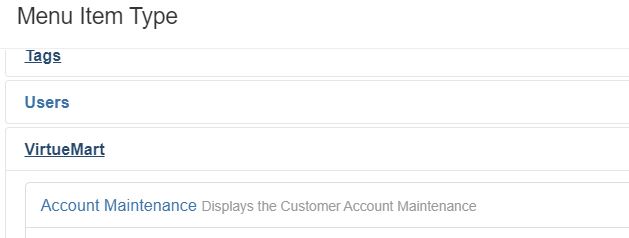
1-Edit or create a menu item for the Virtuemart USer Account Maintenance page if you didn’t have one previously

2-Set the page title and the alias to whatever you think is more suitable. You might for instance localize the string.

How to prevent home page modules to show on virtuemart search results page?

Issue: Home page modules show on virtuemart search result pages, which in some cases might not be desirable.

Solution: The solution that is widely found searching on the internet is that you need to create a menu item for the search module. If you do so, and use the virtuemart search module, this should not give any results. The missing step is that you need to create an overwrite for your virtuemart seach module and edit it. In the search form action, replace index.php by “search” or whatever you set the search menu item alias to be.

In short:

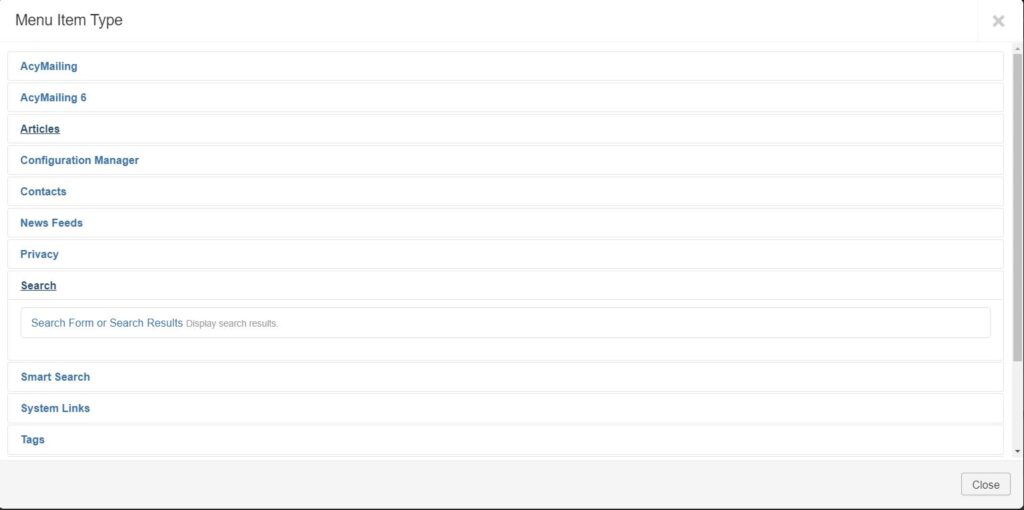
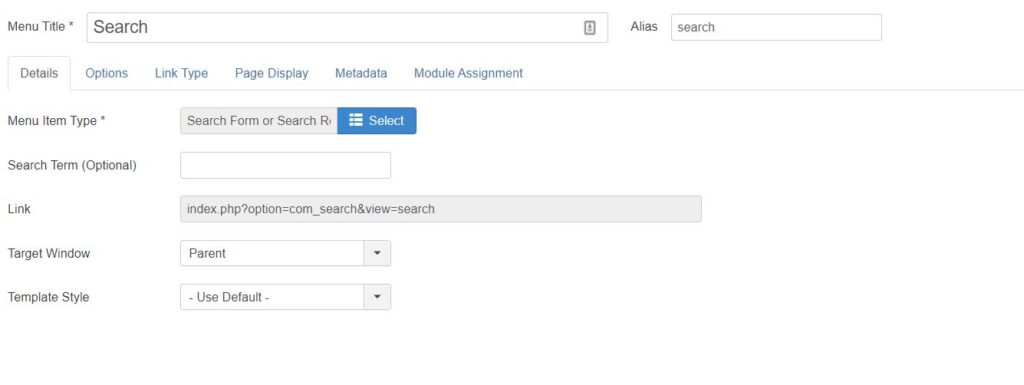
1- Create menu item for joomla search

When selecting the menu item type, select “Search Form or Search Results”
Note the alias for the page, as you will need it at a later step.

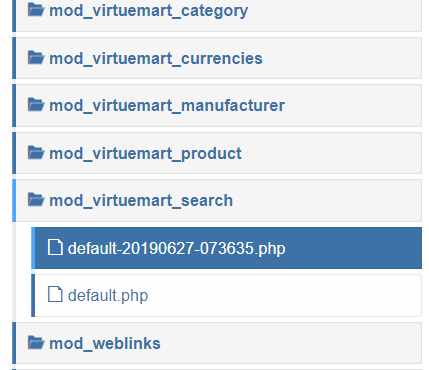
2-In your templates customization page, create an override for the mod_virtuemart_search default.php file:

3- Open the override you created and modify the route to point it to the newly created search page:

JRoute::_ ('index.php?option=com_virtuemart&view=category&limitstart=0', FALSE);
JRoute::_ ('search?option=com_virtuemart&view=category&limitstart=0', FALSE);

4- Control where the modules are displayed as usual.

Login with Facebook in Laravel 5.8

To add social media login functionality to Laravel 5.8, one library come over and over again, it’s socialite.

https://github.com/laravel/socialite

SSH into your server and run the following command in the directory where your Laravel is installed:

composer require laravel/socialite

As composer is locked after install. I needed to reinstall completely. On my host, the installation needs to be global for it to work (or at least, a local install did not do the trick). So I ran

composer global remove laravel/installer
composer global require laravel/installer laravel/socialite
cd Path/to/my/directory
laravel new ProjectName --auth

without global, laravel was an unknown command.

Official documentation can be found on the Laravel website:

https://laravel.com/docs/6.x/socialite

Additional resources:

https://medium.com/@confidenceiyke/laravel-5-8-facebook-socialite-authentication-8863b9a43f11

https://getcomposer.org/doc/01-basic-usage.md

https://getcomposer.org/doc/03-cli.md

https://getcomposer.org/doc/01-basic-usage.md

Add google Recaptcha control on login form in Laravel

To implement Google Recaptcha in Laravel check our article on implementing Google Recaptcha for Laravel registration.

in /app/Http/Controllers/Auth/LoginController.php

Add the following lines:

use Illuminate\Http\Request;
use App\Rules\GoogleRecaptcha;

And before theclosing curly brackets:

/** 
* Validate the user login request. 
* 
* @param  \Illuminate\Http\Request  $request 
* @return void 
*/ 
protected function validateLogin(Request $request) 
{ 
    $this->validate($request, [ 
    $this->username() => 'required|string', 
    'password' => 'required|string', 
    'g-recaptcha-response' => ['required', new GoogleRecaptcha], 
    ]); 
}

Login with user name instead of email in Laravel

Default laravel login is set to work with email and password but there might be some instance where login with an email address is not desirable and you might want to change this to login with a username.

The advantage of logging in with an email address is that you can be sure it will be unique. The drawback is that it is a bit long to type and some people are not comfortable giving their email address, so depending on your type of application, where having the email address is not essential, it makes sense to offer to login with a username instead.

In Laravel 5.8

Add the following function in app/Http/Controllers/Auth/LoginController.php

/**
*Use username instead of default (email address)
*for authentication
**/
public function username(){
    return ('name');
}

in the return(‘name’) statement, ‘name’ stand for the column name in your user table in your database you want to use. In my case the column is ‘name’.

in resources/views/auth/login.blade.php change the email login field with a username field as follow:

<div class="form-group row">
    <label for="name" class="col-md-4 col-form-label text-md-right">{{ __('Name') }}</label>
    <div class="col-md-6">
       <input id="name" type="text" class="form-control" name="name" required>
  </div>
</div>

As you are now using the username instead of the email for logging in, you need to make sure the username is the unique. To do that you will need to modify your migrations file for create_users_table.php

table->string('name')->unique(); 

And you are all set.